Securing Your CI/CD Pipeline in the Cloud: A Practical Approach
In today's fast-paced software development world, Continuous Integration and Continuous Delivery (CI/CD) pipelines are the backbone of rapid and reliable software releases. However, these pipelines are also increasingly becoming prime targets for attackers. A compromised CI/CD pipeline can lead to devastating consequences, from data breaches to supply chain attacks. Migrating your CI/CD to the cloud offers scalability and flexibility, but also introduces new security challenges. This guide provides a practical approach to securing your CI/CD pipeline in the cloud, safeguarding your software delivery process from vulnerabilities and ensuring a secure software supply chain.
Understanding the CI/CD Pipeline Security Landscape
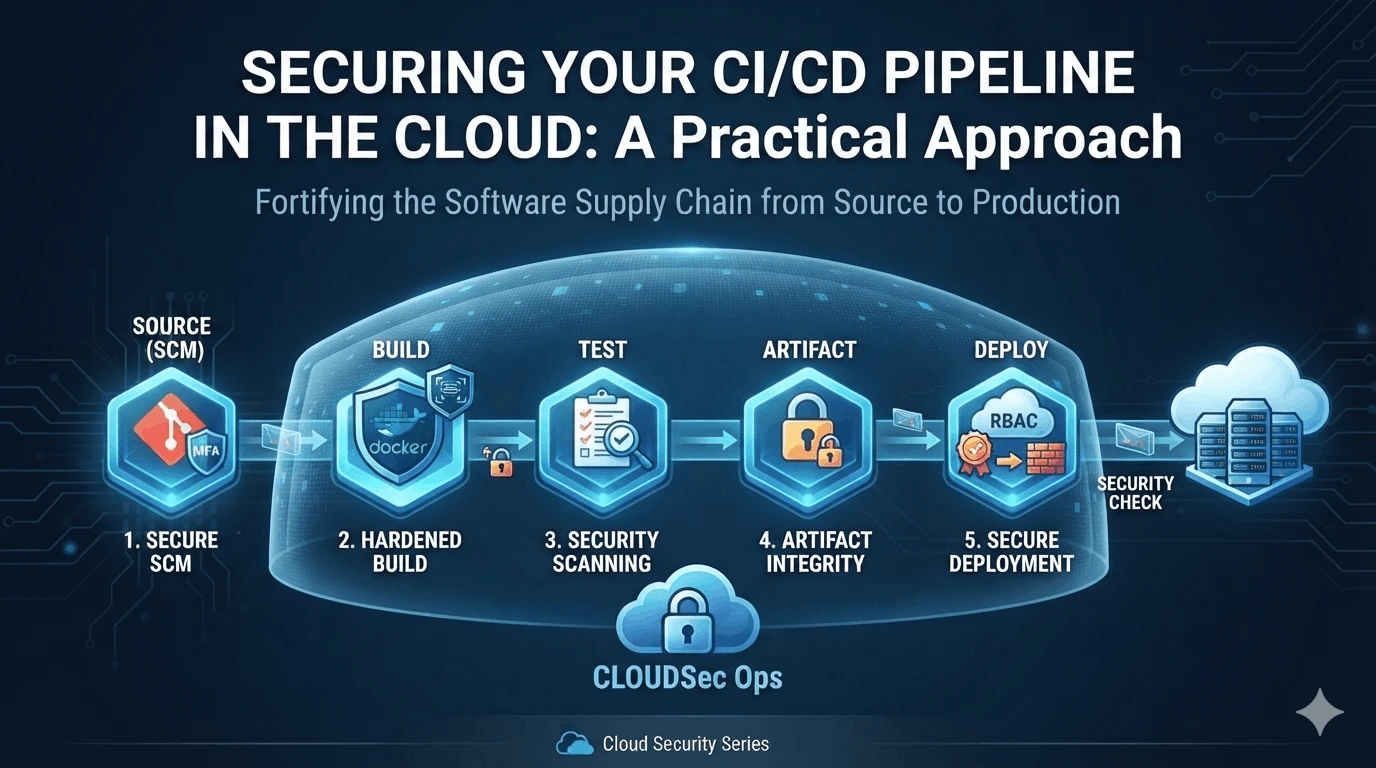
Before diving into specific security measures, it’s crucial to understand the potential attack vectors within your CI/CD pipeline. The pipeline consists of multiple stages, each representing a potential entry point for malicious actors. These stages typically include:
Source Code Management (SCM): Repositories like GitHub, GitLab, or Bitbucket. Compromising the SCM system grants access to the entire codebase.
Build Stage: Where code is compiled, dependencies are resolved, and artifacts are created. A compromised build environment can inject malicious code into the final product.
Testing Stage: Where automated tests are executed. Attackers might try to disable tests or inject malicious test cases to bypass security checks.
Deployment Stage: Where the application is deployed to the target environment. Compromised deployment credentials can grant unauthorized access to production systems.
Artifact Repository: Holds the build artifacts. If insecure, malicious code can be injected directly.
A comprehensive security strategy must address all these potential vulnerabilities.
Practical Steps to Secure Your Cloud-Based CI/CD Pipeline
Here’s a breakdown of actionable steps you can take to fortify your CI/CD pipeline in the cloud:
1. Secure Your Source Code Management (SCM)
Your source code is the crown jewel. Protect it fiercely.
Implement Multi-Factor Authentication (MFA): Enforce MFA for all users with access to the SCM system. This adds an extra layer of security beyond passwords.
Principle of Least Privilege: Grant users only the minimum necessary permissions. Avoid granting broad access rights. For example, use read-only access for developers who only need to review code.
Code Review Processes: Implement rigorous code review processes to identify vulnerabilities before they are merged into the main branch. Use automated code analysis tools to assist in this process.
Branch Protection Rules: Enable branch protection rules to prevent direct commits to main branches and require code reviews before merging.
Secret Scanning: Implement secret scanning to automatically detect secrets (API keys, passwords, etc.) accidentally committed to the repository. Tools like GitHub Advanced Security and GitLab Secret Detection can help with this.
Example: Imagine a developer accidentally commits an AWS access key to a public GitHub repository. Without secret scanning, this key could be exploited within minutes. Secret scanning immediately detects and alerts you, allowing you to revoke the compromised key.
2. Harden the Build Environment
The build environment is where your application is assembled. Ensure its integrity.
Immutable Infrastructure: Use immutable infrastructure for your build agents. This means that build agents are created from a predefined image and are not modified during the build process. This prevents attackers from injecting malicious code by modifying the build environment. Docker is a good example of technology allowing for immutable infrastructure.
Secure Dependencies: Use dependency management tools (e.g., Maven, npm, pip) to manage and verify the integrity of your dependencies. Regularly scan your dependencies for known vulnerabilities using tools like OWASP Dependency-Check or Snyk.
Secure Build Scripts: Ensure that your build scripts are secure and free from vulnerabilities. Avoid using hardcoded credentials or secrets in your build scripts. Use environment variables or a secrets management service to store sensitive information.
Container Security: If using containers (like Docker) to build your application, scan the container images for vulnerabilities using tools like Trivy or Clair. Follow best practices for container security, such as using minimal base images and avoiding running containers as root.
Isolate the build environment: Run builds in isolated environments to prevent them from affecting each other. This can be achieved using containerization or virtual machines.
3. Secure the Testing Stage
Automated testing is crucial, but also a potential attack vector.
Comprehensive Testing: Implement a comprehensive suite of automated tests, including unit tests, integration tests, and security tests.
Security Scanning: Integrate security scanning tools into your testing pipeline. These tools can automatically scan your application for vulnerabilities such as SQL injection, cross-site scripting (XSS), and other common web application vulnerabilities. Examples include OWASP ZAP and Burp Suite.
Penetration Testing: Conduct regular penetration testing to identify vulnerabilities that may have been missed by automated security scanning tools.
Static Analysis Security Testing (SAST): Integrate SAST tools into your pipeline to analyze the source code for potential vulnerabilities before compilation. This allows for the detection and remediation of security flaws early in the development lifecycle.
Dynamic Analysis Security Testing (DAST): DAST tools analyze the application while it's running, simulating real-world attacks to identify vulnerabilities.
4. Secure Deployment
Deployment is the final step. Protect your production environment.
Principle of Least Privilege (again): Ensure that deployment credentials have only the necessary permissions to deploy the application to the target environment.
Secrets Management: Use a secrets management service (e.g., HashiCorp Vault, AWS Secrets Manager, Azure Key Vault) to securely store and manage deployment credentials and other sensitive information. Avoid storing secrets in plain text in configuration files or environment variables.
Infrastructure as Code (IaC): Use IaC tools (e.g., Terraform, CloudFormation) to define and manage your infrastructure. This allows you to automate the deployment process and ensure that your infrastructure is configured consistently and securely.
Automated Rollbacks: Implement automated rollback procedures to quickly revert to a previous version of the application if a deployment fails or introduces a critical bug.
Monitor the infrastructure: Continuously monitor infrastructure for suspicious activities. Integrate threat detection solutions to alert on anomalies.
5. Secure the Artifact Repository
Artifact repositories hold the building blocks of your applications. Secure them accordingly.
Access Control: Implement strict access control to limit who can read, write, or delete artifacts.
Integrity Checks: Use checksums (e.g., SHA256) to verify the integrity of artifacts before deployment.
Vulnerability Scanning: Scan artifacts for known vulnerabilities before deployment.
Immutable Artifacts: Ensure that artifacts are immutable once they are created and stored in the repository.
Continuous Monitoring and Improvement
Security is not a one-time activity. It's a continuous process. Regularly monitor your CI/CD pipeline for security vulnerabilities and implement improvements as needed. Key activities include:
Regular Audits: Conduct regular security audits of your CI/CD pipeline to identify vulnerabilities and ensure that security controls are effective.
Security Training: Provide regular security training to your development team to raise awareness of security risks and best practices.
Incident Response Plan: Develop and maintain an incident response plan to quickly respond to security incidents.
Stay Updated: Keep abreast of the latest security threats and vulnerabilities. Subscribe to security advisories and regularly update your tools and dependencies.
Conclusion
Securing your CI/CD pipeline in the cloud is essential for protecting your software delivery process and ensuring a secure software supply chain. By implementing the practical steps outlined in this guide, you can significantly reduce the risk of a successful attack and build a more resilient and secure CI/CD pipeline. Remember, security is a continuous journey, not a destination. By adopting a proactive and layered approach, you can stay ahead of the evolving threat landscape and keep your software safe.