Most teams ship security late. A pen test happens once a year, findings pile up in a spreadsheet, and the same classes of bugs return in the next release. Application security testing built into the delivery pipeline fixes this by catching vulnerabilities where they're cheapest to fix: in the code before it merges, and in the running app before it reaches production.
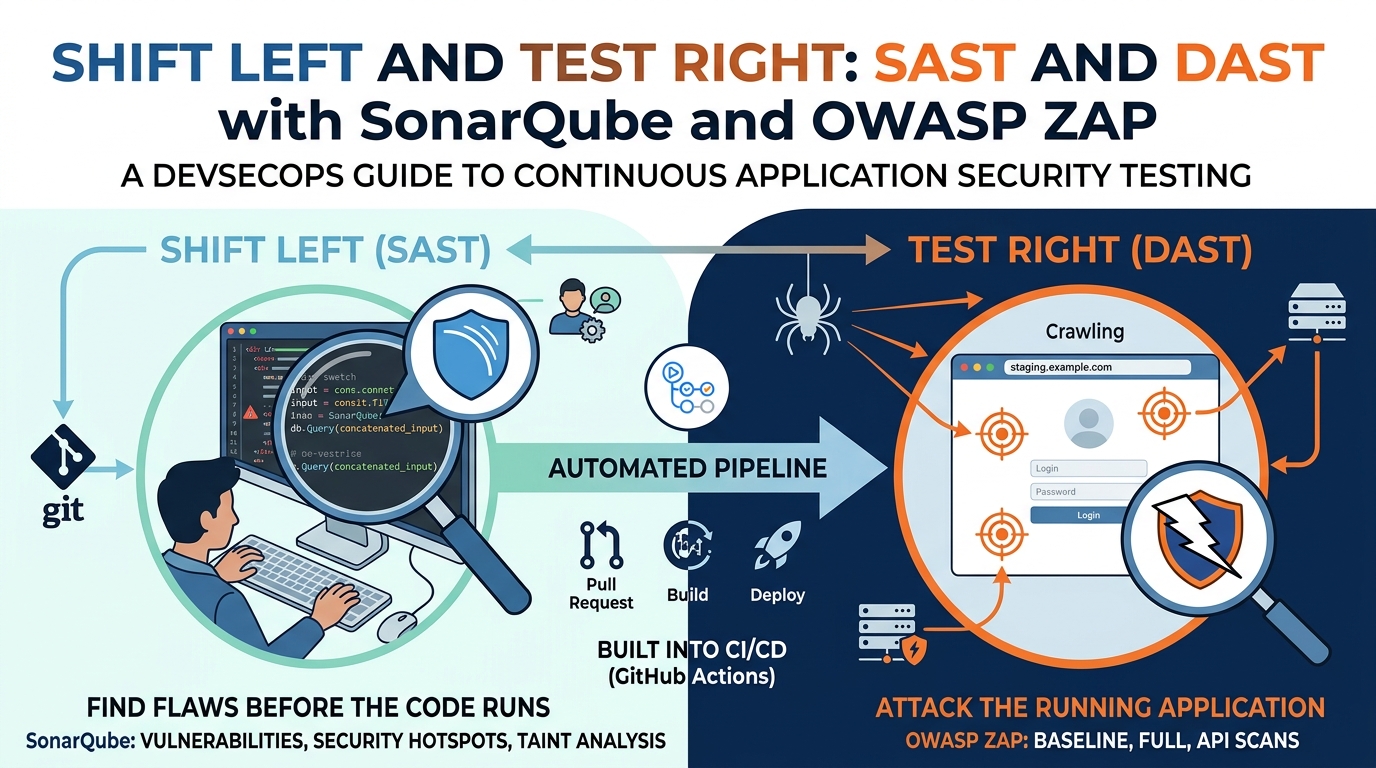
Two complementary techniques do most of this work. Static Application Security Testing (SAST) reads your source code. Dynamic Application Security Testing (DAST) attacks your running application. SonarQube and OWASP ZAP are the most widely adopted open-source tools for each, and together they cover a large share of what an attacker would try.
SAST: finding flaws before the code runs
SAST analyzes source code, bytecode, or binaries without executing them. It traces how data flows through the application and flags patterns that lead to known vulnerability classes: SQL injection, cross-site scripting, hardcoded credentials, insecure deserialization, weak cryptography, path traversal.
Because it works on code, SAST runs early. A developer opens a pull request, the analysis runs in CI, and findings appear on the exact line that introduced them. There's no environment to deploy and no test data to prepare. The trade-off is that SAST has no runtime context. It can't see how the app is deployed, what headers the server sends, or how components interact in production, and it produces false positives that need triage.
SonarQube in practice
SonarQube analyzes more than 30 languages and reports security findings in three buckets:
Vulnerabilities : confirmed issues such as an unsanitized user input reaching a database query.
Security hotspots : security-sensitive code that needs human review, such as use of a hashing function or a cookie set without the
Secureflag.Taint analysis : tracking untrusted input from source (an HTTP parameter) to sink (a query, a file path, a shell command) across method and file boundaries.
The feature that makes SonarQube useful in a pipeline is the Quality Gate. You define conditions the code must meet no new critical vulnerabilities, all new hotspots reviewed, coverage above a threshold on new code and the gate fails the build when they aren't met. Focusing gates on new code is deliberate: it stops the codebase getting worse without demanding that the team fix ten years of legacy findings before shipping anything.
A minimal GitHub Actions job looks like this:
yaml
sast:
  runs-on: ubuntu-latest
  steps:
    - uses: actions/checkout@v4
      with:
        fetch-depth: 0   # full history for accurate new-code detection
    - name: SonarQube Scan
      uses: SonarSource/sonarqube-scan-action@v3
      env:
        SONAR_TOKEN: ${{ secrets.SONAR_TOKEN }}
        SONAR_HOST_URL: ${{ secrets.SONAR_HOST_URL }}
    - name: Quality Gate
      uses: SonarSource/sonarqube-quality-gate-action@master
      env:
        SONAR_TOKEN: ${{ secrets.SONAR_TOKEN }}
With pull request decoration enabled, findings show up as inline comments on the PR, so developers fix them in the same context they wrote the code.
DAST: attacking the application the way an attacker would
DAST tests a running application from the outside. It has no access to the source. It crawls the app, sends crafted requests, and inspects responses for signs of vulnerability: reflected input, error messages that leak stack traces, missing security headers, injectable parameters, broken authentication flows.
Because it works on the deployed application, DAST finds what SAST can't: server misconfigurations, issues in third-party components, problems that only appear when services are wired together, and vulnerabilities in languages or frameworks the static analyzer doesn't support. Its limits are the mirror image of SAST's: it can only test what it can reach, it doesn't know which line of code caused a finding, and a full active scan takes time.
OWASP ZAP in practice
ZAP (Zed Attack Proxy) works as an intercepting proxy and automated scanner. Three scan modes matter for pipelines:
Baseline scan : spiders the target for a few minutes and runs passive checks only. It never sends attack payloads, so it's safe against any environment and fast enough to run on every deployment. It catches missing headers, cookie flags, information disclosure, and similar hygiene issues.
Full scan : spiders the target, then runs active attacks: injection payloads, path traversal attempts, authentication probes. Run this against a dedicated staging environment, never against production, and expect it to take longer.
API scan : takes an OpenAPI, GraphQL, or SOAP definition and tests each endpoint directly, which is far more thorough than crawling for APIs that have no UI to spider.
ZAP ships Docker images and official GitHub Actions for each mode. A baseline scan after a staging deploy:
yaml
dast:
  runs-on: ubuntu-latest
  needs: deploy-staging
  steps:
    - name: ZAP Baseline Scan
      uses: zaproxy/action-baseline@v0.14.0
      with:
        target: 'https://staging.example.com'
        rules_file_name: '.zap/rules.tsv'
        cmd_options: '-a'
The rules.tsv file lets you set individual rules to IGNORE, WARN, or FAIL, so the scan breaks the build only on findings you've decided matter. Start with everything as WARN, review the first few reports, then promote the rules you care about to FAIL.
For authenticated areas of the app, ZAP supports form-based, JSON, and header-based authentication through the Automation Framework, which uses a YAML plan to define contexts, users, and scan steps. That's the right path once you outgrow the single-action scans.
Why you need both
SAST (SonarQube)DAST (OWASP ZAP)TestsSource codeRunning applicationRunsOn every commit or PRAfter deploy to test/stagingFindsInjection flaws, hardcoded secrets, unsafe patterns, taint pathsMisconfigurations, missing headers, runtime injection, auth flawsBlind toDeployment, configuration, third-party servicesCode location, unreachable pathsSpeedMinutesMinutes (baseline) to hours (full)PinpointsExact file and lineRequest and response
SAST tells you the query on line 142 concatenates user input. DAST tells you the login endpoint returns a stack trace on malformed JSON. Neither would find the other's issue. Running both in the same pipeline closes the gap between "the code looks secure" and "the deployed system is secure."
Putting it together in a pipeline
A workable sequence for a typical CI/CD flow:
Pull request opened : SonarQube scans the diff. Quality Gate blocks merge if new critical or high vulnerabilities appear.
Merge to main : build and push the container image. Add image scanning here (Trivy, Amazon Inspector) to cover OS and dependency CVEs, which neither SAST nor DAST addresses.
Deploy to staging : ZAP baseline scan runs immediately. Fails the pipeline on rules set to
FAIL.Nightly or pre-release : ZAP full scan or API scan against staging, with results reviewed by the team rather than blocking automatically.
Triage : route findings to the issue tracker. SonarQube and ZAP both export SARIF, which GitHub's code scanning tab ingests, giving one view across both tools.
Practical advice
Tune before you enforce. Both tools produce noise on first run. Spend a sprint reviewing findings, marking false positives, and setting rule severities before making anything block a build. A gate that's always red gets ignored.
Scope DAST carefully. Point ZAP only at environments you own, exclude logout and destructive endpoints from the spider, and use a dedicated test account. An active scan against production can trigger alerts, exhaust rate limits, or modify data.
Keep scans proportional. SonarQube on every PR, ZAP baseline on every staging deploy, ZAP full scan nightly. Trying to run everything everywhere slows the pipeline until people start skipping it.
Neither replaces a human. SAST and DAST catch known vulnerability patterns. Business logic flaws, authorization mistakes specific to your domain, and chained attacks still need code review and periodic manual testing.
Conclusion
SonarQube and OWASP ZAP are free, mature, and integrate with every major CI system. Together they give you continuous coverage from the first line of code to the deployed endpoint, and they turn security findings into something developers see and fix in their normal workflow rather than a report that arrives after release. Start with SonarQube on pull requests and a ZAP baseline scan on staging, tune the rules, then expand from there.