Building a Production-Ready EKS on EC2 Architecture on AWS
Amazon Elastic Kubernetes Service (EKS) provides a managed Kubernetes control plane while giving teams the flexibility to run Kubernetes workloads on Amazon EC2. This combination—EKS with EC2 worker nodes—is a popular choice for organizations that need control over compute resources, networking, scaling, storage, security, and application deployment.
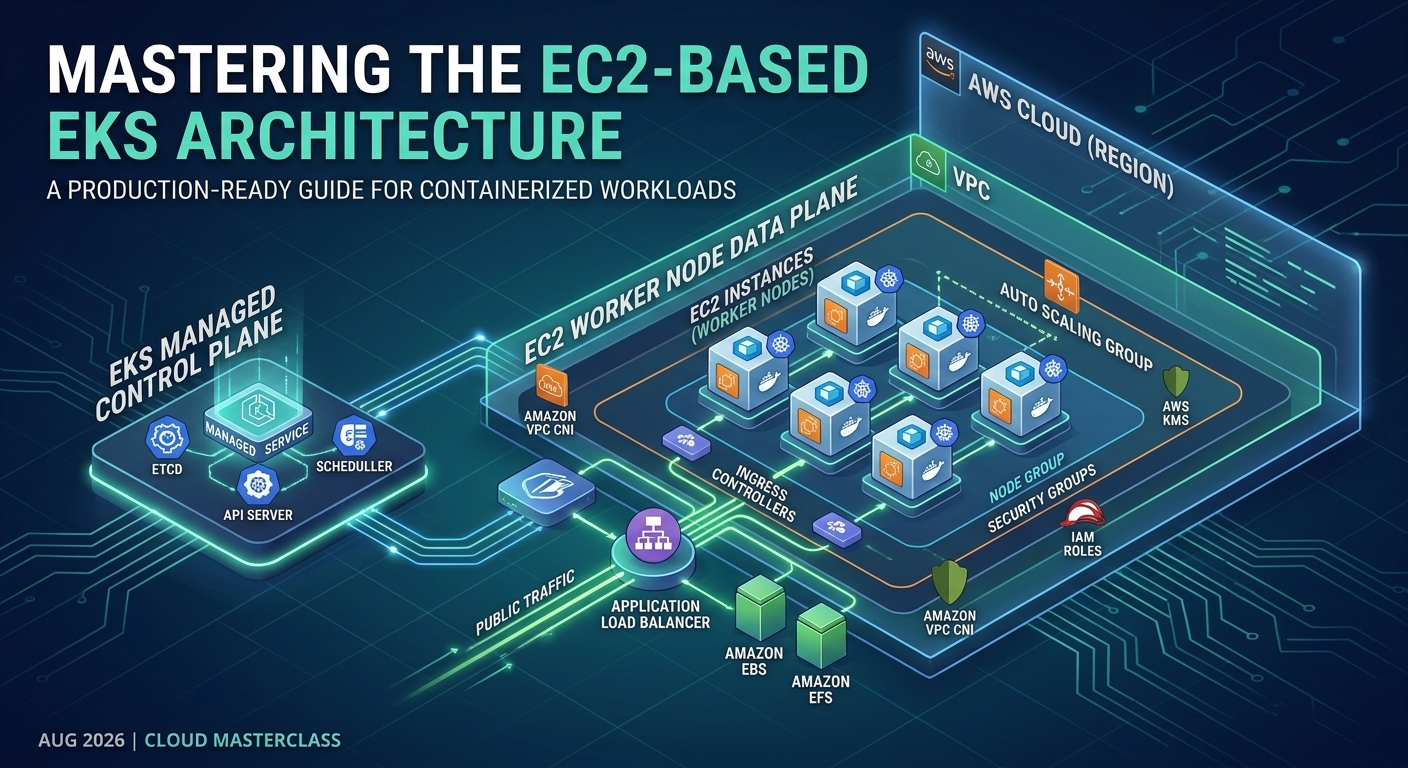
The architecture shown in the reference diagram represents a production-oriented EKS on EC2 architecture built across multiple Availability Zones. It combines Kubernetes with AWS-native services such as Application Load Balancer, Route 53, AWS WAF, Amazon RDS, Amazon EFS, Amazon S3, CloudWatch, AWS Secrets Manager, and notification services.
This article walks through the architecture from the user's request all the way to the Kubernetes workloads and supporting AWS services.
1. High-Level Architecture
At a high level, the request flow looks like this:
User → Route 53 → CloudFront → AWS WAF → Application Load Balancer → Kubernetes Ingress → EKS workloads
The EKS cluster runs inside an Amazon VPC and spans multiple Availability Zones. EC2 instances act as Kubernetes worker nodes, while managed AWS services provide databases, persistent storage, monitoring, security, backups, and notifications.
The architecture can be divided into several major layers:
DNS and edge layer
Security layer
Network and load-balancing layer
EKS and EC2 compute layer
Application and data layer
Storage layer
Monitoring and observability layer
Notification and operational services
This separation makes the platform easier to secure, operate, scale, and troubleshoot.
2. DNS and Edge Layer
The architecture starts with Amazon Route 53, which provides DNS resolution for the application.
When a user accesses the application, Route 53 directs the request toward the AWS edge infrastructure.
The architecture also includes Amazon CloudFront, which acts as the content delivery and edge layer. CloudFront can reduce latency for users by serving cacheable content from locations closer to them.
For applications that expose public APIs or web interfaces, the edge layer provides several benefits:
Reduced latency
Global content distribution
TLS termination
Integration with AWS WAF
Reduced load on the application infrastructure
Better handling of large numbers of client requests
CloudFront is particularly useful when the application contains static assets such as JavaScript, CSS, images, and downloadable content.
3. Protecting the Application with AWS WAF
Before traffic reaches the application infrastructure, it can pass through AWS WAF.
AWS WAF provides a layer of protection against common web-based attacks and unwanted traffic patterns.
For example, organizations can configure rules to protect applications from:
SQL injection
Cross-site scripting
Malicious HTTP requests
IP-based threats
Rate-based attacks
Known attack patterns
The important architectural principle is that security should be applied before traffic reaches the Kubernetes workloads.
Instead of allowing every request to reach the cluster, the edge layer can filter potentially malicious traffic first.
4. The VPC: Foundation of the Architecture
The EKS environment is deployed inside an Amazon VPC.
The reference architecture uses multiple Availability Zones, providing redundancy and improving application availability.
Each Availability Zone contains the networking and compute components required to serve application traffic.
A simplified layout looks like:
                    AWS Region
                        |
              +---------+---------+
              |                   |
        Availability Zone A  Availability Zone B
              |                   |
        Public Subnet         Public Subnet
              |                   |
          Load Balancer       Load Balancer
              |                   |
        Private Subnet       Private Subnet
              |                   |
         EC2 / EKS Nodes     EC2 / EKS Nodes
Keeping Kubernetes worker nodes in private subnets is a common production practice because the nodes do not need to be directly accessible from the public internet.
Public-facing load-balancing components can receive external traffic and forward it to workloads running inside the private network.
5. Application Load Balancer and Kubernetes Ingress
The architecture uses an Application Load Balancer (ALB) to distribute application traffic.
Inside Kubernetes, an Ingress resource defines how incoming HTTP/HTTPS requests should be routed to application services.
The flow is therefore approximately:
User
  |
Route 53
  |
CloudFront
  |
AWS WAF
  |
Application Load Balancer
  |
Kubernetes Ingress
  |
Kubernetes Service
  |
Application Pod
This approach separates infrastructure-level traffic management from application-level routing.
For example, an organization could route:
example.com/api      → API service
example.com/orders   → Order service
example.com/users    → User service
The ALB can therefore become the entry point to multiple Kubernetes services without exposing individual pods directly to the internet.
6. EKS Control Plane and EC2 Worker Nodes
The central component of the architecture is Amazon EKS.
EKS provides the managed Kubernetes control plane, while the architecture shown in the diagram uses EC2 instances as worker nodes.
This is an important distinction.
With EKS on EC2:
AWS manages the Kubernetes control plane.
The organization manages the EC2 worker nodes.
Kubernetes schedules pods onto those EC2 instances.
Teams have greater control over instance types and operating-system configuration.
Applications can take advantage of EC2-specific capabilities.
The worker nodes are distributed across multiple Availability Zones.
For example:
                 EKS Cluster
                      |
          +-----------+-----------+
          |                       |
       AZ-A                    AZ-B
          |                       |
   +------+-----+           +-----+------+
   | EC2 Node   |           | EC2 Node   |
   | EC2 Node   |           | EC2 Node   |
   +------------+           +------------+
If one Availability Zone experiences a failure, workloads can potentially continue running in another Availability Zone, assuming the applications and Kubernetes workloads have been configured for high availability.
7. Kubernetes Managed Node Components
The diagram also represents several Kubernetes and AWS integration components running around the EKS worker nodes.
Typical EKS clusters include components such as:
VPC CNI
The Amazon VPC CNI allows Kubernetes pods to communicate using AWS VPC networking.
This makes pod networking closely integrated with the underlying AWS network architecture.
CoreDNS
CoreDNS provides service discovery inside the Kubernetes cluster.
Applications can communicate with Kubernetes services using DNS names rather than hard-coded IP addresses.
kube-proxy
kube-proxy helps implement Kubernetes Service networking and directs network traffic toward the appropriate pods.
EBS CSI Driver
The EBS Container Storage Interface driver allows Kubernetes workloads to use Amazon EBS volumes as persistent storage.
EFS CSI Driver
The EFS CSI driver allows Kubernetes pods to mount Amazon EFS file systems when shared file storage is required.
These components form an important bridge between Kubernetes and AWS infrastructure services.
8. Persistent Storage with Amazon EBS and Amazon EFS
Not every application can rely on ephemeral container storage.
The architecture therefore includes AWS storage services to provide persistent data.
Amazon EBS
Amazon EBS is useful for block storage.
It can be used for workloads that require persistent volumes with block-storage semantics.
Typical use cases include:
Stateful applications
Application data
Kubernetes Persistent Volumes
Databases that require block storage
The EBS CSI driver allows Kubernetes to dynamically provision and attach EBS volumes to workloads.
Amazon EFS
Amazon EFS provides managed shared file storage.
Unlike an EBS volume, EFS is designed for shared file access and can be mounted by workloads across Availability Zones.
This makes it useful for applications that require:
Shared configuration
Uploaded files
Shared application assets
Common file repositories
Multiple pods accessing the same filesystem
The combination of EBS and EFS allows Kubernetes applications to choose the appropriate storage model for their requirements.
9. Database Layer with Amazon RDS
The architecture separates application compute from persistent database infrastructure by using Amazon RDS.
This is a strong architectural pattern.
Rather than running the database inside Kubernetes, the application pods communicate with a managed RDS database.
This provides several operational advantages:
Managed database infrastructure
Automated backups
Easier patching
High-availability options
Database monitoring
Reduced operational responsibility for Kubernetes teams
The application layer remains focused on running containers, while the database layer is handled by a managed AWS service.
A typical flow is:
Kubernetes Pod
      |
      | Database connection
      v
Amazon RDS
Security groups and private networking should be used to ensure that only authorized application workloads can communicate with the database.
10. Amazon S3 for Object Storage
The architecture also includes Amazon S3.
S3 is appropriate for object-based data rather than traditional filesystem storage.
Applications can use S3 for:
Images
Documents
Reports
Backups
Logs
Static assets
Data exports
Application-generated files
A useful design principle is to avoid storing large objects directly inside containers or EC2 instances.
Instead:
Application
    |
    +---- Transactional data → RDS
    |
    +---- Shared filesystem → EFS
    |
    +---- Block storage → EBS
    |
    +---- Objects/files → S3
This allows each storage technology to be used for the workload it is best suited to handle.
11. Security and Secrets Management
Security is not limited to the network perimeter.
The architecture includes services such as AWS IAM and AWS Secrets Manager to protect access to AWS resources and sensitive application information.
IAM can control which Kubernetes workloads or AWS identities are allowed to access specific AWS services.
Secrets Manager can be used for sensitive values such as:
Database credentials
API keys
Application secrets
Service credentials
Other sensitive configuration
A good production architecture avoids embedding secrets directly into:
Docker images
Git repositories
Kubernetes manifests
Application source code
Instead, secrets should be retrieved securely at runtime.
This significantly reduces the risk of credentials being accidentally exposed through source control or container images.
12. Monitoring and Observability
Running Kubernetes in production requires more than simply knowing whether pods are running.
The reference architecture includes a monitoring and observability layer that can incorporate services such as Amazon CloudWatch, Amazon Managed Service for Prometheus, and visualization tools.
The observability stack can monitor:
EC2 infrastructure
Kubernetes nodes
Pods
Application metrics
CPU and memory utilization
Request rates
Error rates
Application logs
Kubernetes events
A typical monitoring flow can be represented as:
Applications
     |
     +---- Metrics ----→ Prometheus
     |
     +---- Logs ------→ CloudWatch / Log aggregation
     |
     +---- Dashboards → Visualization
This is critical because Kubernetes environments can become difficult to troubleshoot when hundreds of pods and multiple services are involved.
13. Centralized Logging
Application logs should be collected centrally instead of relying on logs stored on individual EC2 instances.
A centralized logging architecture makes it easier to answer questions such as:
Why did a pod restart?
Which service generated an error?
When did latency increase?
Which node experienced a problem?
Did an application deployment cause the incident?
Log aggregation also makes historical troubleshooting much easier.
For production systems, logs should ideally include structured information such as:
Timestamp
Application/service name
Environment
Request ID
Trace ID
Severity
Error information
This makes searching and correlating events much easier.
14. Notifications and Operational Alerts
The reference architecture also includes notification services.
Monitoring systems can generate alerts when infrastructure or applications exceed predefined thresholds.
For example:
High CPU
   ↓
Monitoring System
   ↓
Alert
   ↓
Notification Service
   ↓
Email / Operations Team
Notifications can be used for:
Application failures
High CPU utilization
Memory pressure
Node failures
Database problems
Deployment failures
Security events
Service availability issues
The goal is to make the platform observable and actionable rather than simply collecting metrics.
15. Backup and Disaster Recovery
Production Kubernetes environments also require a backup strategy.
The architecture includes AWS backup/storage-related components that can support protection of critical infrastructure and application data.
Backup planning should consider different categories of data:
DataPotential Protection StrategyRDS dataAutomated RDS backups and snapshotsEBS volumesEBS snapshots / AWS BackupEFS filesAWS BackupS3 objectsVersioning and lifecycle policiesKubernetes configurationGit-based infrastructure/configuration managementContainer imagesContainer registry with lifecycle policies
A key principle is that Kubernetes cluster recovery and application data recovery are separate problems.
Recreating an EKS cluster is not enough if the underlying business data has been lost.
16. Why Use EKS with EC2?
One of the biggest advantages of EKS on EC2 is control.
Organizations can select appropriate EC2 instance types based on their workloads.
For example:
General-purpose instances for typical microservices
Compute-optimized instances for CPU-heavy workloads
Memory-optimized instances for memory-intensive applications
GPU-enabled instances for machine-learning workloads
Teams also have greater control over:
Node groups
Instance sizing
Operating-system configuration
Kubernetes scheduling
Networking
Storage
Capacity planning
This makes EKS on EC2 particularly useful for organizations with mature DevOps and platform engineering teams.
17. High Availability Across Availability Zones
One of the most important characteristics of the reference architecture is its multi-AZ design.
Running workloads across multiple Availability Zones helps reduce the impact of a single-AZ failure.
A production Kubernetes application should ideally avoid concentrating all replicas on a single node or Availability Zone.
For example:
                    Load Balancer
                         |
              +----------+----------+
              |                     |
             AZ-A                  AZ-B
              |                     |
          Pod Replica           Pod Replica
              |                     |
          EC2 Nodes             EC2 Nodes
              |                     |
              +----------+----------+
                         |
                        RDS
Kubernetes scheduling mechanisms such as pod anti-affinity and topology spread constraints can be used to distribute replicas appropriately.
The result is a platform that is better prepared for infrastructure failures.
18. End-to-End Request Flow
Putting everything together, the architecture can be understood through a complete request flow.
Step 1: User Request
A user accesses the application through a domain name.
Step 2: Route 53
Route 53 resolves the domain and directs traffic toward the AWS edge infrastructure.
Step 3: CloudFront
CloudFront handles edge delivery and can cache appropriate content.
Step 4: AWS WAF
WAF evaluates the incoming request against configured security rules.
Step 5: Application Load Balancer
The request reaches the ALB, which distributes traffic toward the Kubernetes environment.
Step 6: Kubernetes Ingress
The Kubernetes Ingress determines which application service should receive the request.
Step 7: Kubernetes Service
The Kubernetes Service provides stable networking to the appropriate pods.
Step 8: Application Pod
The application processes the request.
Step 9: Backend Services
Depending on the operation, the application may communicate with:
Amazon RDS
Amazon EFS
Amazon EBS
Amazon S3
Other AWS services
Step 10: Observability
Metrics and logs are collected by the monitoring and logging infrastructure.
Step 11: Notification
If an important threshold or failure occurs, the alerting system can notify the operations team.
19. Advantages of This Architecture
The architecture illustrated in the reference diagram provides several important benefits.
Scalability
Kubernetes can scale application pods horizontally, while EC2 node groups can scale the underlying compute capacity.
High Availability
Multiple Availability Zones reduce dependence on a single physical AWS location.
Security
CloudFront, WAF, IAM, private subnets, security groups, and Secrets Manager provide multiple security controls.
Flexibility
Teams can run different workloads on different EC2 instance types.
Managed Services
EKS, RDS, EFS, S3, CloudWatch, and other AWS services reduce the amount of infrastructure that teams must build from scratch.
Observability
Centralized metrics and logging provide visibility into application and infrastructure health.
Operational Resilience
Backups, multi-AZ deployment, monitoring, and alerting improve recovery capabilities.
20. Important Design Considerations
Although EKS on EC2 is powerful, it also introduces operational responsibilities.
Teams need to manage:
EC2 node groups
Node patching
Kubernetes upgrades
Capacity planning
Pod resource requests and limits
Cluster networking
Security policies
Monitoring
Logging
Cost optimization
Incorrect resource requests can lead to inefficient infrastructure utilization, while oversized EC2 instances can increase costs unnecessarily.
A mature implementation should therefore combine Kubernetes best practices with AWS infrastructure best practices.
Conclusion
The reference architecture demonstrates how Amazon EKS with EC2 worker nodes can form the core of a production-grade cloud platform.
The architecture does not rely on Kubernetes alone. Instead, it combines Kubernetes with AWS managed services:
Route 53 + CloudFront + WAF provide the external access and security layer.
ALB + Kubernetes Ingress provide application traffic routing.
EKS + EC2 provide container orchestration and compute.
RDS + EBS + EFS + S3 provide different forms of persistent data storage.
IAM + Secrets Manager provide identity and secrets management.
CloudWatch + Prometheus + dashboards + alerting provide observability.
Together, these components create a scalable, secure, highly available platform capable of supporting modern microservices and enterprise applications.
The biggest strength of this architecture is the separation of responsibilities: Kubernetes focuses on application orchestration, EC2 provides flexible compute, and AWS managed services handle specialized infrastructure capabilities.
That combination makes EKS on EC2 a strong architecture for organizations that need both the portability and orchestration capabilities of Kubernetes and the flexibility of AWS infrastructure.